
Meta Ads Lead Generation: How to Win Qualified Leads on Facebook & Instagram

Updated: 7 days ago

Table of Contents
What Is Meta Ads Lead Generation?
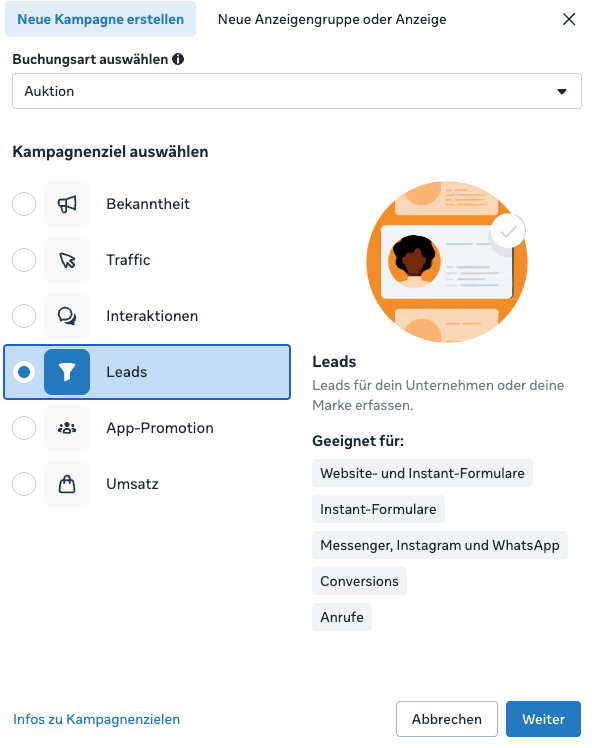
With lead generation using Meta Ads, you run ads on Facebook and Instagram with the goal of collecting contact details from potential customers.
Unlike a classic e-commerce campaign, the focus is not on a direct purchase.
A conversion can be, for example, any of the following:
Contact request
Appointment booking
Sign-up
Quote request
Consultation
Application
Each of these counts as a conversion.
In principle, you have two particularly relevant options for Meta Ads lead generation.
1. Meta Instant Forms
The user clicks on your ad and fills out a form directly within Facebook or Instagram. They don’t have to leave the platform to do so.
2. Website Leads via a Landing Page
The user clicks on your Meta ad and lands on your website or landing page. There, they learn about your offer and then submit a form.
Both options can work. Which one is better depends mainly on your offer, your target audience, your sales process, and your technical capabilities.
Who Is Meta Ads Lead Generation Suitable For?
Meta Ads lead generation is particularly suitable for businesses where further steps are needed between the first contact and the actual purchase.
Typical use cases include:
Service providers
B2B companies
Coaches and consultants
Educational institutions
Recruiting and social recruiting
Take a consulting company, for example.
Hardly anyone sees an Instagram ad and immediately buys a consultation worth several thousand euros. But an ad can spark interest and lead to a first inquiry or appointment booking.
Your sales process then takes over.
Especially for services that require explanation, higher prices, and longer decision-making processes, Meta Ads lead generation can therefore be interesting.
When Are Meta Ads Less Suitable?
Meta Ads can generate demand and amplify existing interest. But they don’t solve every fundamental problem with your offer.
If your offer isn’t attractive, your value for money doesn’t work, or your sales process can’t handle the inquiries you generate, even a good campaign will struggle.
You should also keep an important difference from Google Ads in mind:
People on Facebook and Instagram usually aren’t actively searching for your offer.
Your ad therefore first has to attract attention, address a relevant problem, and create interest in your solution.
Meta Ads Lead Generation: Instant Forms or Website Leads?
One of the most important decisions in Meta Ads lead generation is where the conversion takes place.
Should the user fill out an Instant Form within Meta or switch to your landing page?
Both options have clear advantages and disadvantages.
Meta Instant Forms
Instant Forms open directly within Facebook or Instagram.
Contact details such as name, email address, or phone number can be partially pre-filled automatically. This allows the user to submit the form within a short time.
That significantly lowers the barrier to entry.
Advantages of Instant Forms
The biggest advantage is the simple user experience.
The user doesn’t have to leave Facebook or Instagram. This means fewer steps between the ad and the conversion.
This often leads to:
more leads and lower costs per lead.
The technical effort is also comparatively low. You don’t necessarily need your own landing page and can quickly test a first lead campaign.
With custom questions, you can additionally pre-qualify your leads.
You could ask, for example:
When do you want to start the project?
Answer options:
immediately
within the next 4 weeks
within the next 3 months
I’m just gathering information for now
Even a question like this gives your sales team additional information about the lead’s readiness to buy.
Disadvantages of Instant Forms
The low barrier to entry can also become a problem.
If an inquiry can be submitted within a few seconds, the level of commitment is sometimes lower.
That can lead to leads who:
have hardly any interest
can’t be reached
entered incorrect contact details
no longer remember their inquiry
That’s why you should never look at a low CPL for Instant Forms in isolation.
Website Leads
With website leads, you send the user to your own landing page.
Here you can explain your offer in more detail, show references, answer objections, and qualify the prospect more thoroughly before they inquire.
That raises the barrier to entry.
But that can be exactly what you want.
Advantages of Website Leads
You control the entire customer journey.
You decide:
which information is shown
which references the user sees
which questions are answered
which form fields have to be filled out
which tracking events are triggered
Especially for high-priced offers or offers that require explanation, this additional context can improve lead quality.
Disadvantages of Website Leads
The technical effort is higher.
You need a working landing page and should capture your conversions cleanly via the Meta Pixel and ideally also via the Conversions API.
Consent management, the form, and tracking also have to work together.
In addition, the extra step can cause your CPL to turn out higher.
When Do I Recommend Instant Forms and When Website Leads?
Instant Forms are particularly suitable when:
you want to test a campaign quickly
you don’t have a good landing page
your offer is relatively easy to understand
you need additional lead volume
you can qualify leads sufficiently through form questions
Website leads are particularly suitable when:
your offer requires explanation
your offer has a higher price
trust is especially important before the inquiry
you want to pre-qualify more extensively
your tracking is set up cleanly
For me, website leads are the first choice whenever possible, because you have more control over the entire customer journey.
That doesn’t mean, however, that Instant Forms are generally worse.
With a sufficient budget, you can test both options against each other. What matters afterward is not just the CPL, but the quality of the leads generated.
How Can You Improve Lead Quality with Meta Ads?
Sooner or later, many lead campaigns get the same feedback from sales:
“We don’t need more leads. We need better leads.”
This is exactly where you should look more closely.
Because higher lead quality often also means lower lead volume.
Use Form Questions for Pre-Qualification
One of the simplest options is qualifying within the form.
Depending on your offer, you can ask for the following information, for example:
Need
Budget
Company size
Desired start date
Current situation
A B2B service provider could ask, for example:
“What is your monthly marketing budget?”
An education provider, on the other hand, could ask:
“When do you want to start your further training?”
The questions have to fit your sales process.
Five additional questions just for the sake of qualification can
needlessly hurt your conversion rate.
More Pre-Qualification Doesn’t Automatically Mean Better Campaigns
Every additional question creates friction.
In simplified terms, this leads to the following relationship:
Little pre-qualification → more leads, potentially lower quality
Stronger pre-qualification → fewer leads, potentially higher quality
Companies often want all of this at once:
more leads + better leads + lower costs.
But these three goals can’t all be maximized at the same time.
A Cheap Meta Lead Is Not Automatically a Good Lead
Suppose campaign A generates:
100 leads × €15 = €1,500 in ad spend.
That produces two customers.
Campaign B generates:
40 leads × €30 = €1,200 in ad spend.
That produces five customers.
If you only look at the CPL, campaign A looks better.
For your business, though, campaign B is significantly more valuable.
That’s why, in addition to the cost per lead, you should look at other metrics:
Qualified lead rate → appointment rate → closing rate → customer acquisition cost
This is exactly why you need data from your CRM or your sales process.
Improving Meta Ads Lead Generation with CRM and Conversion Leads
In my view, this is one of the biggest levers for professional Meta Ads lead generation.
Because Meta initially only knows what happens within the campaign.
The algorithm sees, for example:
Person A → lead
Person B → lead
Both conversions initially look equally valuable.
In your CRM, however, it may later turn out that:
Person A → unreachable
Person B → qualified lead → appointment → offer → customer
You should use this information to optimize your campaigns.
Automatically Transfer Meta Leads to Your CRM
You can connect your Meta lead generation with CRM systems such as HubSpot, Brevo, or Salesforce, for example.
New leads then land in the CRM automatically and can be processed right away.
That has another advantage:
Your sales team can respond faster.
Instead of downloading lead lists manually, a follow-up process can start immediately after an inquiry comes in.
In the CRM, you then document your funnel:
Lead → qualified lead → appointment → offer → customer
This creates a much better data foundation than the CPL alone.
What Are Conversion Leads in Meta Ads?
Via CRM integrations and the Conversions API, you can send relevant downstream events back to Meta.
This gives Meta additional information about which leads are actually valuable for your business.
Put simply, you’re no longer optimizing only for:
Find people who fill out my form.
Instead, you give Meta additional signals:
This type of lead develops into a qualified lead for me.
This feedback becomes especially interesting with higher lead volume and longer sales processes.
Step by Step: How to Set Up a Meta Ads Lead Campaign
If you want to get started with Meta Ads lead generation, you can follow this process.
Step 1: Define Your Target Lead
Before you open the Ads Manager, you should know who you actually want to win.
Define, for example:
Target audience
Problem
Offer
Desired qualification
Value of a customer
Step 2: Define Your Conversion
What should happen after someone clicks on your ad?
For example:
Ad → landing page → form → appointment
or:
Ad → Instant Form → CRM → follow-up call
The clearer the process, the better you can measure it later.
Step 3: Decide Between an Instant Form and a Landing Page
For a simple offer or a first test, an Instant Form can make sense.
For a high-priced offer or one that requires explanation, I would rather work with a good landing page.
Step 4: Set Up Your Tracking
For website leads, you should at least measure the successful submission of the form as a lead event.
Before launching the campaign, check whether the event is actually triggered correctly.
For Instant Forms, you should also make sure that new leads reliably end up in your CRM or your follow-up process.
Step 5: Develop Multiple Creatives and Angles
Don’t start with just one ad.
Test different:
Hooks
Problems
Benefits
Testimonials
Visuals
Videos
One creative could address the problem directly.
Another shows a concrete customer success.
A third explains your offer.
This gives Meta different signals and lets you find out which messaging works for your audience.
Step 6: Launch the Campaign and Collect Data
Don’t change your campaign after just a few hours because no lead has come in yet.
Give the system enough data and don’t overreact to every short-term fluctuation.
Step 7: Don’t Just Evaluate the CPL
After the first leads, the actual analysis begins.
Check:
Which campaign brings in qualified leads?
Which ad brings in appointments?
Which leads become customers?
Only this data shows you where you can sensibly scale your budget.
The Most Important Success Factors for Meta Ads Lead Generation
1. The Right Audience Strategy
Don’t rely exclusively on interest targeting.
Today, your creative takes on a significant part of audience targeting.
An ad with the opening:
“You’re already running Meta Ads, but your leads don’t turn into customers?”
automatically speaks to a different person than:
“Do you want to win customers through Facebook for the first time?”
So targeting doesn’t only happen in the Ads Manager.
2. Creatives with Different Angles
Don’t test the same creative five times with a different background color.
Test different arguments.
For example:
Problem angle: “Your leads are cheap, but your sales team can’t do anything with them?”
Outcome angle: “How to win qualified inquiries through Meta Ads.”
Proof angle: Show a concrete case or a customer example.
This is how you learn which message actually generates demand.
3. A Fitting Offer
“Contact us now” is rarely a particularly strong offer.
Give the user a concrete reason to leave their contact details.
That could be, for example, an initial consultation, an analysis, a consulting appointment, or a specific information request.
4. Clean Tracking
For a website campaign, you should submit a test lead yourself before launch.
Then check:
Was the lead event triggered?
Did the lead arrive in the CRM?
Was the right campaign attributed?
This five-minute test can save you days of faulty data.
5. Fast Follow-Up
A lead is not yet a customer.
That’s why, even before the campaign launches, define who contacts new leads and what the rest of the process looks like.
Automated emails can help with this. For consulting-intensive offers, however, they don’t necessarily replace personal contact.
6. Continuous Optimization
Don’t just look at the Ads Manager.
If Meta shows a CPL of €20, but your sales team reports that hardly anyone can be reached, you have a quality problem.
If leads cost €60 but regularly turn into customers, the campaign can be very profitable.
The Most Common Mistakes in Meta Ads Lead Generation
Mistake 1: Only Looking at the Cost per Lead
A low CPL looks good in reporting.
But it doesn’t tell you whether the leads actually generate revenue.
That’s why you should at least also evaluate the share of qualified leads and your closing rate.
Mistake 2: Measuring the Lead Event Incorrectly
A classic tracking error:
The lead event is triggered as soon as the form button is clicked, rather than only after a successful submission.
Meta then reports more leads than actually came in.
That’s why you should test your events before launch.
Mistake 3: Asking Too Many Form Questions
Every question can reduce your conversion rate.
So only ask for things that you will actually use later for qualification or in sales.
Mistake 4: Downloading Instant Leads Manually
If your sales team only exports Meta leads from the Ads Manager once a day or even every few days, it creates unnecessary delay.
Transfer leads into your CRM automatically whenever possible.
Mistake 5: Testing Only One Ad
One creative can work.
But it can just as easily flop.
Test multiple messages and formats instead of making the success of your entire campaign depend on a single ad.
Mistake 6: Looking at the Landing Page and Ads Separately
A good CTR doesn’t help you much if nobody fills out the form afterward.
That’s why you should analyze the entire funnel:
Impression → click → landing page → lead → qualified lead → customer
Practical Tips for Better Meta Ads Leads
From my experience, you should consistently implement five things above all:
Test every form and the entire funnel. Especially after changes to the form, website, or tracking.
Continuously optimize your landing page. Ads and landing page belong to one shared funnel.
Set up your CRM and automations early. That way you don’t lose any leads and can collect quality data.
Get feedback from sales. A media buyer doesn’t automatically see in the Ads Manager how good the inquiries really are.
Evaluate campaigns by business results. Lead volume and CPL are intermediate goals. What matters are qualified inquiries and customers.
The last point in particular is important:
Meta Ads management and sales shouldn’t work separately from each other on lead campaigns.
The better the information from the sales process flows back into marketing, the better you can optimize your campaigns.
Data Protection and GDPR: What You Should Keep in Mind
If you use Meta Ads for lead generation, you should also handle personal data properly. Even simple forms usually collect information such as name, email address, or phone number. This data can’t just be processed any way you like; it has to be collected transparently, for a specific purpose, and in compliance with the law.
It is especially important that your users know which data you ask for, why you ask for it, and how you process it further. A clearly linked privacy policy therefore belongs in every lead campaign. This creates not only legal certainty but also trust with potential customers.
Also make sure to ask only for the data you really need for the next step. The less sensitive information you ask for right in the first contact, the lower the barrier for the user and the simpler your form stays.
If you work with CRM systems, automations, or email marketing, you should also make sure that these processing steps are GDPR-compliant as well. This includes, among other things, proper consent where it is required, as well as transparent handling of how data is shared and stored.
For your Meta Ads lead generation, the following therefore applies: the more clearly you communicate data protection, data use, and lead processing, the more professional your overall presence appears. And the more willing users are to entrust you with their contact details.
Conclusion: How Successful Meta Ads Lead Generation Works
Meta Ads lead generation works especially well when you don’t stop measuring at the lead.
Which setup makes sense for you depends on your offer and your sales process:
Instant Forms are interesting if you want to start quickly, need a low barrier to entry, don’t have a suitable landing page, or want to generate additional lead volume.
Website leads are what I would prefer if your offer is higher-priced or requires explanation and you want to inform and qualify prospects in more detail before they inquire.
A CRM connection becomes especially important as soon as you generate leads regularly and want to know which of them are actually qualified, book appointments, or become customers. With this information, you can increasingly evaluate your Meta Ads based on real business results rather than just the CPL.
For me, this is the core of a good lead campaign:
Not generating as many leads as possible. But as many leads as possible that eventually turn into customers. That’s exactly how I run lead campaigns as part of my Meta Ads management.
Do you want to set up your Meta Ads lead generation professionally or optimize existing campaigns for better lead quality?
Then I’ll support you with strategy, campaign structure, tracking, CRM integration, and ongoing optimization of your Meta Ads.


Comments